AI Development Environment Setup
preparing the tools, software, and computing environment needed for machine learning development
Core Concepts Covered
- Setting up standard packages and virtual environments
- Configuring VS Code, Jupyter notebooks, and terminal commands
- Hardware acceleration (CUDA/Metal GPU acceleration) for training models
1. Virtual Environments and Package Managers
Machine learning projects often need different versions of the same library. One repository might depend on PyTorch 1.12 while another expects PyTorch 2.4. If both share one global Python installation, upgrading either project can break the other, so we give each project its own environment.
To avoid this, we create isolated sandboxes called Virtual Environments using two standard tools:
• pip & venv: Python's built-in, lightweight tools. Running python3 -m venv ai_env creates a physical folder (ai_env) containing a copy of the Python interpreter, standard libraries, and its own binaries. Activating the environment alters your terminal shell's PATH variable, forcing the shell to search that local folder first when running python commands.
• Conda: A comprehensive package, environment, and dependency manager designed for scientific computing. While pip is restricted strictly to Python packages, Conda can install non-Python system dependencies (such as compiled CUDA toolkit drivers, C++ compilers, or graph visualization binaries) directly into your sandbox, making it highly robust for complex machine learning setups.
# 1. Create a virtual environment named 'ai_env' using Python venv
python3 -m venv ai_env

# 2. Activate the virtual environment
# On macOS/Linux:
source ai_env/bin/activate
# On Windows (PowerShell):
# .\ai_env\Scripts\Activate.ps1

# 3. Upgrade pip and install standard machine learning libraries
pip install --upgrade pip
pip install numpy pandas scikit-learn matplotlib torch torchvisionSuccessfully created virtual environment 'ai_env'.
Upgraded pip to v26.0.
Installed packages: numpy (v2.1), pandas (v2.2), scikit-learn (v1.5), matplotlib (v3.9), torch (v2.4).2. Leveraging Cloud Compute: Google Colab
Training a deep neural network involves a huge number of matrix calculations. A GPU can perform many of them in parallel, while the same training job may run much more slowly or exceed available memory on a standard CPU.
Google Colab solves this by providing a free, cloud-hosted Jupyter Notebook environment directly integrated with Google Drive. Under the hood, Colab spins up a virtual Linux container and grants you access to high-performance NVIDIA hardware (like the Tesla T4, V100, or A100 GPUs) for free.
How to configure a GPU Runtime in Colab:
1. Open a new notebook in Google Colab.
2. Click on Runtime in the top navigation menu, then select Change runtime type.
3. In the Hardware Accelerator dropdown, switch from None (CPU) to T4 GPU (or any active GPU options) and click Save.
4. This instantly reallocates your container instance, connecting a physical GPU to your python kernel, unlocking 50x-100x matrix mathematical speedups.
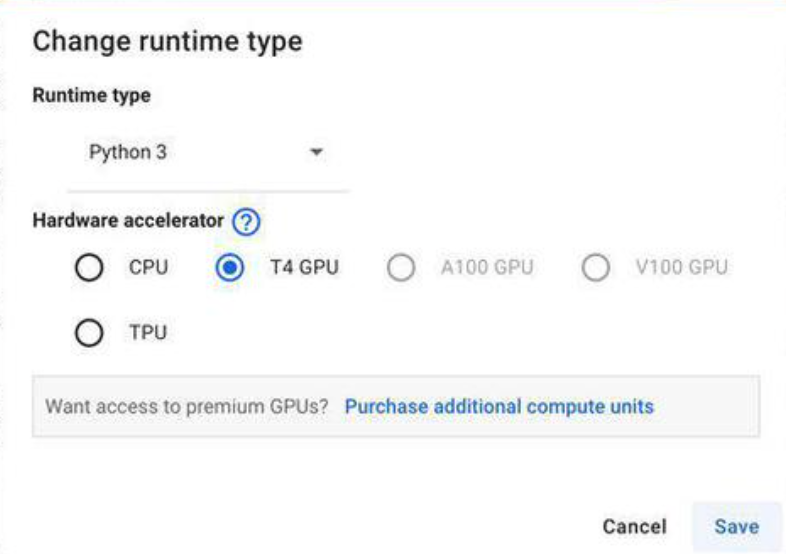
Visual web representation showing runtime hardware accelerator configurations. Click Runtime → Change runtime type → Choose T4 GPU → Click Save.
# Verify if Google Colab's GPU runtime is correctly active
import torch

gpu_available = torch.cuda.is_available()
print("GPU Runtime Active:", gpu_available)

if gpu_available:
    device_name = torch.cuda.get_device_name(0)
    print("Allocated GPU Hardware:", device_name)
else:
print("Warning: Currently running on standard CPU. Switch runtime to GPU under settings.")GPU Runtime Active: True
Allocated GPU Hardware: Tesla T43. GPU Hardware Acceleration (CUDA vs. Metal)
PyTorch needs a software layer that can send tensor operations to your GPU. The backend you use depends mainly on the hardware and operating system in your computer:
• CUDA (Compute Unified Device Architecture): NVIDIA's proprietary parallel computing platform. CUDA acts as a bridge, allowing PyTorch to compile python tensor operations directly into parallel instructions executed on NVIDIA's CUDA cores. CUDA is the absolute gold standard for AI research and is required to train large language models or massive computer vision networks on server-grade GPU clusters.
• MPS (Metal Performance Shaders): Apple's native graphics acceleration framework for macOS. Since Apple Silicon (M1/M2/M3/M4) chips use a Unified Memory Architecture (where the CPU and GPU share the same physical memory pool), the MPS backend allows PyTorch tensors to run directly on the chip's integrated GPU without the time-consuming step of transferring memory buffers between CPU RAM and GPU memory over PCIe lanes.
# Select appropriate device target dynamically in your model script
import torch

if torch.cuda.is_available():
    device = torch.device("cuda")
    print("Target set to NVIDIA CUDA GPU.")
elif torch.backends.mps.is_available():
    device = torch.device("mps")
    print("Target set to Apple Silicon Metal GPU.")
else:
    device = torch.device("cpu")
print("Target set to CPU. Highly recommended to use GPU compute for deep learning models.")Target set to NVIDIA CUDA GPU.Interactive Practice Quiz
Test your understanding with instant feedback
What is the primary reason developers use Python 'Virtual Environments' (like venv or Conda) in machine learning?
In Google Colab, how do you unlock massive speedups for deep learning training loops?
Which parallel computing framework is the global industry standard for accelerating machine learning on NVIDIA graphics cards?
If you are developing a model on a modern macOS machine with Apple Silicon, which backend is used to accelerate PyTorch tensors?
Which of the following commands is used to activate a newly created virtual environment on macOS or Linux?
Which package and environment manager is capable of installing compiled non-Python system dependencies like CUDA toolkit libraries directly into your sandbox?
What actually happens to your terminal session when you run the environment activation command source ai_env/bin/activate?
Why is a GPU (Graphics Processing Unit) significantly faster than a CPU for training neural networks?
How does Apple Silicon's Unified Memory Architecture benefit GPU tensor calculations when using the MPS (Metal Performance Shaders) backend?
In Google Colab, under which menu can you switch your notebook runtime to leverage cloud GPU compute hardware?
Further Readings
Explore these highly recommended external references to deepen your understanding